Friday, April 19, 2024
Friday, April 19, 2024 @ 8:00 AM
Not planning with an iFlightPlanner Premium membership is likely costing you - using these four simple planning tools will help save you fuel, time, and money every time you fly!
Detailed Aircraft Performance Profiles
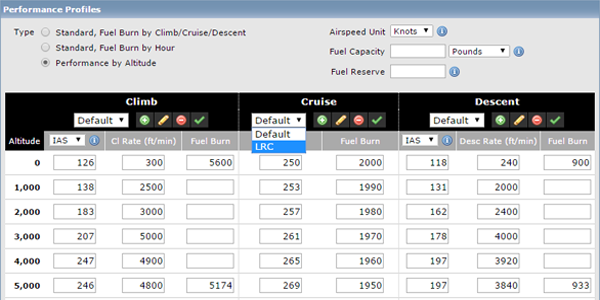
iFlightPlanner offers the most detailed aircraft performance profiles of any flight planning solution. Not only can you input performance data by altitude, but as an iFlightPlanner Premium, you're able to create and plan using multiple performance profiles that will maximize your aircraft's range or cruise speed. The flight planner is so robust that it interpolates aircraft performance based on all available data, and gets more precise as you add details to the profile for each altitude.
Do you have performance profiles that you've perfected for your aircraft? Let us know, the iFlightPlanner Crew will be happy to help add it to your account!
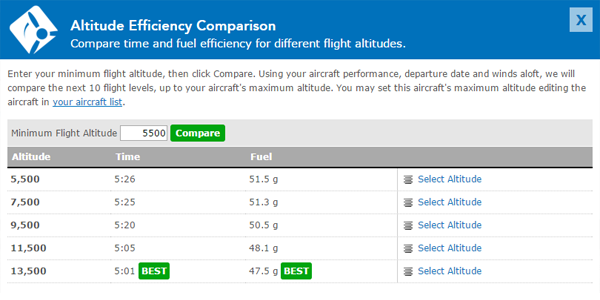
Altitude Efficiency Comparison Tool
Leveraging your detailed aircraft performance profiles, iFlightPlanner can compare every altitude (up to your aircraft's maximum) to identify the quickest, and most fuel-efficient altitudes for your flight. Simply click the Compare Altitudes button in the online Flight Planning Interface or in iFlightPlanner for iPad to discover the fuel savings waiting for you enroute!
Aircraft Fuel Range Mapping
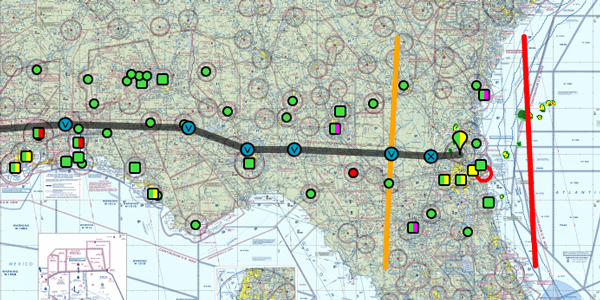
Instantly see if you can reach your destination non-stop, or know when you'll begin burning your predetermined reserve fuel with our fuel range identifiers. The orange marker shows where you'll tap into your reserve, while the red marker indicates the maximum range of your aircraft given your route, aircraft performance, and forecasted winds. Each fuel setting is available when editing an aircraft from your My Aircraft list, allowing the markers to appear on the map automatically for iFlightPlanner Premium.
Graphical Fuel Price Map Layers
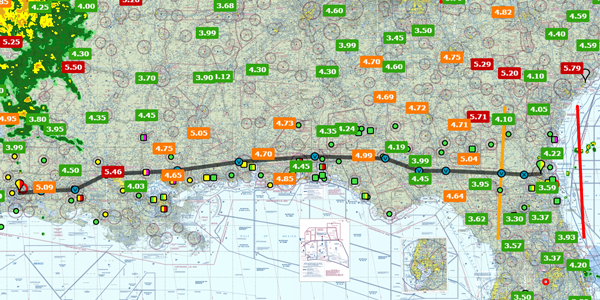
Turn on the fuel price layers in any of our interactive maps, including iFlightPlanner for iPad, to get a look at the most recently reported fuel prices across the country. Each fuel price links to our comprehensive Airport/Facility Directory for each airport, complete with FBO details, runway information, and printable airport diagrams and instrument approach procedures.
Using another EFB but want to switch to iFlightPlanner and take advantage of these great features? Our Competitive Upgrade Program allows you to trade-in your existing subscription and have the time remaining on it added to your new iFlightPlanner Premium.
If you have any questions, please send us a message. We are always happy to help and want you to get the most out of your iFlightPlanner experience!
Monday, March 25, 2024
Monday, March 25, 2024 @ 8:00 AM
 In anticipation of the large number of aircraft operating to and from areas hosting major sporting and entertainment events, the FAA has published updated procedures in its Domestic Notices valid from March 21, 2024 to enhance safety and minimize air traffic delays.
THESE PROCEDURES MAY BE REVISED OR UNAVAILABLE AT THE TIME OF THE EVENT. PILOTS SHOULD CHECK NOTICES AND TRAFFIC ADVISORIES PRIOR TO DEPARTURE TO ENSURE THE MOST CURRENT INFORMATION. THESE NOTICES DO NOT SUPERCEDE RESTRICTIONS PERTAINING TO THE USE OF AIRSPACE CONTAINED IN FDC NOTICES.
Thursday, March 21, 2024
Thursday, March 21, 2024 @ 8:00 AM
Official airport, navigation and chart data for the FAA's 56-day AIRAC cycle beginning March 21, 2024 became current today as of 09:01Z. This includes updated georeferenced data for airport diagrams and instrument approach procedures available in iFlightPlanner for iPad and iFlightPlanner for iPhone.
Anytime you access iFlightPlanner or iFlightPlanner for AOPA from your desktop, laptop, or smartphone browser you can be confident you're seeing the most current and accurate data available.
To ensure iFlightPlanner is current on your iPhone or iPad, simply tap "Check for Updates" in the upper-left corner of the Downloads tab. Each app will quickly tell you which packages need to be updated!
The iFlightPlanner Crew
PLAN. FLY. LOG.
Monday, March 18, 2024
Monday, March 18, 2024 @ 8:00 AM
iFlightPlanner for iPad and iFlightPlanner for iPhone users may now download airport and navigation data as well as aeronautical charts, georeferenced airport diagrams and terminal procedures for the FAA Data Cycle that goes into effect on March 21, 2024. Simply tap the button in the upper-left corner of the Downloads tab to "Check For Updates."
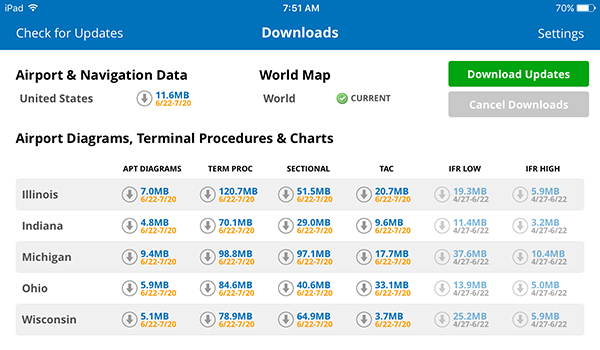
Pilots using iFlightPlanner for AOPA or iFlightPlanner on their desktop, laptop, or mobile device will see the iFlightPlanner Cloud automatically make the transition to the new data at 9:01Z on March 21.
Monday, February 26, 2024
Monday, February 26, 2024 @ 8:00 AM
In anticipation of the large number of aircraft operating to and from areas hosting major sporting and entertainment events, the FAA has published updated procedures in its Domestic Notices valid from February 22, 2024 to enhance safety and minimize air traffic delays.
THESE PROCEDURES MAY BE REVISED OR UNAVAILABLE AT THE TIME OF THE EVENT. PILOTS SHOULD CHECK NOTICES AND TRAFFIC ADVISORIES PRIOR TO DEPARTURE TO ENSURE THE MOST CURRENT INFORMATION. THESE NOTICES DO NOT SUPERCEDE RESTRICTIONS PERTAINING TO THE USE OF AIRSPACE CONTAINED IN FDC NOTICES.
Thursday, February 22, 2024
Thursday, February 22, 2024 @ 8:00 AM
Official airport, navigation and chart data for the FAA's 28-day AIRAC cycle beginning February 22, 2024 became current today as of 09:01Z. This includes updated georeferenced data for airport diagrams and instrument approach procedures available in iFlightPlanner for iPad and iFlightPlanner for iPhone.
Anytime you access iFlightPlanner or iFlightPlanner for AOPA from your desktop, laptop, or smartphone browser you can be confident you're seeing the most current and accurate data available.
To ensure iFlightPlanner is current on your iPhone or iPad, simply tap "Check for Updates" in the upper-left corner of the Downloads tab. Each app will quickly tell you which packages need to be updated!
The iFlightPlanner Crew
PLAN. FLY. LOG.
Monday, February 19, 2024
Monday, February 19, 2024 @ 8:00 AM
iFlightPlanner for iPad and iFlightPlanner for iPhone users may now download airport and navigation data as well as aeronautical charts, georeferenced airport diagrams and terminal procedures for the FAA Data Cycle that goes into effect on February 22, 2024. Simply tap the button in the upper-left corner of the Downloads tab to "Check For Updates."
Pilots using iFlightPlanner for AOPA or iFlightPlanner on their desktop, laptop, or smartphone will see the iFlightPlanner Cloud automatically make the transition to the new data at 9:01Z on February 22.
Monday, January 29, 2024
Monday, January 29, 2024 @ 8:00 AM
In anticipation of the large number of aircraft operating to and from areas hosting major sporting and entertainment events, the FAA has published updated procedures in its Domestic Notices valid from January 25, 2024 to enhance safety and minimize air traffic delays.
THESE PROCEDURES MAY BE REVISED OR UNAVAILABLE AT THE TIME OF THE EVENT. PILOTS SHOULD CHECK NOTICES AND TRAFFIC ADVISORIES PRIOR TO DEPARTURE TO ENSURE THE MOST CURRENT INFORMATION. THESE NOTICES DO NOT SUPERCEDE RESTRICTIONS PERTAINING TO THE USE OF AIRSPACE CONTAINED IN FDC NOTICES.
Thursday, January 25, 2024
Thursday, January 25, 2024 @ 8:00 AM
Official airport, navigation and chart data for the FAA's 56-day AIRAC cycle beginning January 25, 2024 became current today as of 09:01Z. This includes updated georeferenced data for airport diagrams and instrument approach procedures available in iFlightPlanner for iPad and iFlightPlanner for iPhone.
Anytime you access iFlightPlanner or iFlightPlanner for AOPA from your desktop, laptop, or smartphone browser you can be confident you're seeing the most current and accurate data available.
To ensure iFlightPlanner is current on your iPhone or iPad, simply tap "Check for Updates" in the upper-left corner of the Downloads tab. Each app will quickly tell you which packages need to be updated!
The iFlightPlanner Crew
PLAN. FLY. LOG.
Monday, January 22, 2024
Monday, January 22, 2024 @ 8:00 AM
iFlightPlanner for iPad and iFlightPlanner for iPhone users may now download airport and navigation data as well as aeronautical charts, georeferenced airport diagrams and terminal procedures for the FAA Data Cycle that goes into effect on January 25, 2024. Simply tap the button in the upper-left corner of the Downloads tab to "Check For Updates."
Pilots using iFlightPlanner for AOPA or iFlightPlanner on their desktop, laptop, or smartphone will see the iFlightPlanner Cloud automatically make the transition to the new data at 9:01Z on January 25.
Thursday, December 28, 2023
Thursday, December 28, 2023 @ 8:00 AM
Official airport, navigation and chart data for the FAA's 28-day AIRAC cycle beginning December 28, 2023 became current today as of 09:01Z. This includes updated georeferenced data for airport diagrams and instrument approach procedures available in iFlightPlanner for iPad and iFlightPlanner for iPhone.
Anytime you access iFlightPlanner or iFlightPlanner for AOPA from your desktop, laptop, or smartphone browser you can be confident you're seeing the most current and accurate data available.
To ensure iFlightPlanner is current on your iPhone or iPad, simply tap "Check for Updates" in the upper-left corner of the Downloads tab. Each app will quickly tell you which packages need to be updated!
The iFlightPlanner Crew
PLAN. FLY. LOG.
Monday, December 25, 2023
Monday, December 25, 2023 @ 8:00 AM
iFlightPlanner for iPad and iFlightPlanner for iPhone users may now download airport and navigation data as well as aeronautical charts, georeferenced airport diagrams and terminal procedures for the FAA Data Cycle that goes into effect on December 28, 2023. Simply tap the button in the upper-left corner of the Downloads tab to "Check For Updates."
Pilots using iFlightPlanner for AOPA or iFlightPlanner on their desktop, laptop, or smartphone will see the iFlightPlanner Cloud automatically make the transition to the new data at 9:01Z on December 28.
Monday, December 4, 2023
Monday, December 4, 2023 @ 8:00 AM
In anticipation of the large number of aircraft operating to and from areas hosting major sporting and entertainment events, the FAA has published updated procedures in its Domestic Notices valid from November 30, 2023 to enhance safety and minimize air traffic delays.
THESE PROCEDURES MAY BE REVISED OR UNAVAILABLE AT THE TIME OF THE EVENT. PILOTS SHOULD CHECK NOTICES AND TRAFFIC ADVISORIES PRIOR TO DEPARTURE TO ENSURE THE MOST CURRENT INFORMATION. THESE NOTICES DO NOT SUPERCEDE RESTRICTIONS PERTAINING TO THE USE OF AIRSPACE CONTAINED IN FDC NOTICES.
Thursday, November 30, 2023
Thursday, November 30, 2023 @ 8:00 AM
Official airport, navigation and chart data for the FAA's 56-day AIRAC cycle beginning November 30, 2023 became current today as of 09:01Z. This includes updated georeferenced data for airport diagrams and instrument approach procedures available in iFlightPlanner for iPad and iFlightPlanner for iPhone.
Anytime you access iFlightPlanner or iFlightPlanner for AOPA from your desktop, laptop, or smartphone browser you can be confident you're seeing the most current and accurate data available.
To ensure iFlightPlanner is current on your iPhone or iPad, simply tap "Check for Updates" in the upper-left corner of the Downloads tab. Each app will quickly tell you which packages need to be updated!
The iFlightPlanner Crew
PLAN. FLY. LOG.
Monday, November 27, 2023
Monday, November 27, 2023 @ 8:00 AM
iFlightPlanner for iPad and iFlightPlanner for iPhone users may now download airport and navigation data as well as aeronautical charts, georeferenced airport diagrams and terminal procedures for the FAA Data Cycle that goes into effect on November 30, 2023. Simply tap the button in the upper-left corner of the Downloads tab to "Check For Updates."
Pilots using iFlightPlanner for AOPA or iFlightPlanner on their desktop, laptop, or smartphone will see the iFlightPlanner Cloud automatically make the transition to the new data at 9:01Z on November 30.
Monday, November 6, 2023
Monday, November 6, 2023 @ 8:00 AM
In anticipation of the large number of aircraft operating to and from areas hosting major sporting and entertainment events, the FAA has published updated procedures in its Domestic Notices valid from November 2, 2023 to enhance safety and minimize air traffic delays.
THESE PROCEDURES MAY BE REVISED OR UNAVAILABLE AT THE TIME OF THE EVENT. PILOTS SHOULD CHECK NOTICES AND TRAFFIC ADVISORIES PRIOR TO DEPARTURE TO ENSURE THE MOST CURRENT INFORMATION. THESE NOTICES DO NOT SUPERCEDE RESTRICTIONS PERTAINING TO THE USE OF AIRSPACE CONTAINED IN FDC NOTICES.
Thursday, November 2, 2023
Thursday, November 2, 2023 @ 8:00 AM
Official airport, navigation and chart data for the FAA's 28-day AIRAC cycle beginning November 2, 2023 became current today as of 09:01Z. This includes updated georeferenced data for airport diagrams and instrument approach procedures available in iFlightPlanner for iPad and iFlightPlanner for iPhone.
Anytime you access iFlightPlanner or iFlightPlanner for AOPA from your desktop, laptop, or smartphone browser you can be confident you're seeing the most current and accurate data available.
To ensure iFlightPlanner is current on your iPhone or iPad, simply tap "Check for Updates" in the upper-left corner of the Downloads tab. Each app will quickly tell you which packages need to be updated!
The iFlightPlanner Crew
PLAN. FLY. LOG.
Monday, October 30, 2023
Monday, October 30, 2023 @ 8:00 AM
iFlightPlanner for iPad and iFlightPlanner for iPhone users may now download airport and navigation data as well as aeronautical charts, georeferenced airport diagrams and terminal procedures for the FAA Data Cycle that goes into effect on November 2, 2023. Simply tap the button in the upper-left corner of the Downloads tab to "Check For Updates."
Pilots using iFlightPlanner for AOPA or iFlightPlanner on their desktop, laptop, or smartphone will see the iFlightPlanner Cloud automatically make the transition to the new data at 9:01Z on November 2.
Monday, October 9, 2023
Monday, October 9, 2023 @ 8:00 AM
In anticipation of the large number of aircraft operating to and from areas hosting major sporting and entertainment events, the FAA has published updated procedures in its Domestic Notices valid from October 5, 2023 to enhance safety and minimize air traffic delays.
THESE PROCEDURES MAY BE REVISED OR UNAVAILABLE AT THE TIME OF THE EVENT. PILOTS SHOULD CHECK NOTICES AND TRAFFIC ADVISORIES PRIOR TO DEPARTURE TO ENSURE THE MOST CURRENT INFORMATION. THESE NOTICES DO NOT SUPERCEDE RESTRICTIONS PERTAINING TO THE USE OF AIRSPACE CONTAINED IN FDC NOTICES.
Thursday, October 5, 2023
Thursday, October 5, 2023 @ 8:00 AM
Official airport, navigation and chart data for the FAA's 56-day AIRAC cycle beginning October 5, 2023 became current today as of 09:01Z. This includes updated georeferenced data for airport diagrams and instrument approach procedures available in iFlightPlanner for iPad and iFlightPlanner for iPhone.
Anytime you access iFlightPlanner or iFlightPlanner for AOPA from your desktop, laptop, or smartphone browser you can be confident you're seeing the most current and accurate data available.
To ensure iFlightPlanner is current on your iPhone or iPad, simply tap "Check for Updates" in the upper-left corner of the Downloads tab. Each app will quickly tell you which packages need to be updated!
The iFlightPlanner Crew
PLAN. FLY. LOG.
Monday, October 2, 2023
Monday, October 2, 2023 @ 1:16 PM
iFlightPlanner for iPad and iFlightPlanner for iPhone users may now download airport and navigation data as well as aeronautical charts, georeferenced airport diagrams and terminal procedures for the FAA Data Cycle that goes into effect on October 5, 2023. Simply tap the button in the upper-left corner of the Downloads tab to "Check For Updates."
Pilots using iFlightPlanner for AOPA or iFlightPlanner on their desktop, laptop, or smartphone will see the iFlightPlanner Cloud automatically make the transition to the new data at 9:01Z on October 5.
Monday, September 11, 2023
Monday, September 11, 2023 @ 8:00 AM
In anticipation of the large number of aircraft operating to and from areas hosting major sporting and entertainment events, the FAA has published updated procedures in its Domestic Notices valid from September 7, 2023 to enhance safety and minimize air traffic delays.
THESE PROCEDURES MAY BE REVISED OR UNAVAILABLE AT THE TIME OF THE EVENT. PILOTS SHOULD CHECK NOTICES AND TRAFFIC ADVISORIES PRIOR TO DEPARTURE TO ENSURE THE MOST CURRENT INFORMATION. THESE NOTICES DO NOT SUPERCEDE RESTRICTIONS PERTAINING TO THE USE OF AIRSPACE CONTAINED IN FDC NOTICES.
Thursday, September 7, 2023
Thursday, September 7, 2023 @ 8:00 AM
Official airport, navigation and chart data for the FAA's 28-day AIRAC cycle beginning September 7, 2023 became current today as of 09:01Z. This includes updated georeferenced data for airport diagrams and instrument approach procedures available in iFlightPlanner for iPad and iFlightPlanner for iPhone.
Anytime you access iFlightPlanner or iFlightPlanner for AOPA from your desktop, laptop, or smartphone browser you can be confident you're seeing the most current and accurate data available.
To ensure iFlightPlanner is current on your iPhone or iPad, simply tap "Check for Updates" in the upper-left corner of the Downloads tab. Each app will quickly tell you which packages need to be updated!
The iFlightPlanner Crew
PLAN. FLY. LOG.
Monday, September 4, 2023
Monday, September 4, 2023 @ 8:00 AM
iFlightPlanner for iPad and iFlightPlanner for iPhone users may now download airport and navigation data as well as aeronautical charts, georeferenced airport diagrams and terminal procedures for the FAA Data Cycle that goes into effect on September 7, 2023. Simply tap the button in the upper-left corner of the Downloads tab to "Check For Updates."
Pilots using iFlightPlanner for AOPA or iFlightPlanner on their desktop, laptop, or smartphone will see the iFlightPlanner Cloud automatically make the transition to the new data at 9:01Z on September 7.
Thursday, August 10, 2023
Thursday, August 10, 2023 @ 8:00 AM
Official airport, navigation and chart data for the FAA's 56-day AIRAC cycle beginning August 10, 2023 became current today as of 09:01Z. This includes updated georeferenced data for airport diagrams and instrument approach procedures available in iFlightPlanner for iPad and iFlightPlanner for iPhone.
Anytime you access iFlightPlanner or iFlightPlanner for AOPA from your desktop, laptop, or smartphone browser you can be confident you're seeing the most current and accurate data available.
To ensure iFlightPlanner is current on your iPhone or iPad, simply tap "Check for Updates" in the upper-left corner of the Downloads tab. Each app will quickly tell you which packages need to be updated!
The iFlightPlanner Crew
PLAN. FLY. LOG.
Monday, August 7, 2023
Monday, August 7, 2023 @ 8:00 AM
iFlightPlanner for iPad and iFlightPlanner for iPhone users may now download airport and navigation data as well as aeronautical charts, georeferenced airport diagrams and terminal procedures for the FAA Data Cycle that goes into effect on August 10, 2023. Simply tap the button in the upper-left corner of the Downloads tab to "Check For Updates."
Pilots using iFlightPlanner for AOPA or iFlightPlanner on their desktop, laptop, or smartphone will see the iFlightPlanner Cloud automatically make the transition to the new data at 9:01Z on August 10.
Monday, July 17, 2023
Monday, July 17, 2023 @ 8:00 AM
In anticipation of the large number of aircraft operating to and from areas hosting major sporting and entertainment events, the FAA has published updated procedures in its Domestic Notices valid from July 13, 2023 to enhance safety and minimize air traffic delays.
THESE PROCEDURES MAY BE REVISED OR UNAVAILABLE AT THE TIME OF THE EVENT. PILOTS SHOULD CHECK NOTICES AND TRAFFIC ADVISORIES PRIOR TO DEPARTURE TO ENSURE THE MOST CURRENT INFORMATION. THESE NOTICES DO NOT SUPERCEDE RESTRICTIONS PERTAINING TO THE USE OF AIRSPACE CONTAINED IN FDC NOTICES.
Thursday, July 13, 2023
Thursday, July 13, 2023 @ 8:00 AM
Official airport, navigation and chart data for the FAA's 28-day AIRAC cycle beginning July 13, 2023 became current today as of 09:01Z. This includes updated georeferenced data for airport diagrams and instrument approach procedures available in iFlightPlanner for iPad and iFlightPlanner for iPhone.
Anytime you access iFlightPlanner or iFlightPlanner for AOPA from your desktop, laptop, or smartphone browser you can be confident you're seeing the most current and accurate data available.
To ensure iFlightPlanner is current on your iPhone or iPad, simply tap "Check for Updates" in the upper-left corner of the Downloads tab. Each app will quickly tell you which packages need to be updated!
The iFlightPlanner Crew
PLAN. FLY. LOG.
Monday, July 10, 2023
Monday, July 10, 2023 @ 8:00 AM
iFlightPlanner for iPad and iFlightPlanner for iPhone users may now download airport and navigation data as well as aeronautical charts, georeferenced airport diagrams and terminal procedures for the FAA Data Cycle that goes into effect on July 13, 2023. Simply tap the button in the upper-left corner of the Downloads tab to "Check For Updates."
Pilots using iFlightPlanner for AOPA or iFlightPlanner on their desktop, laptop, or smartphone will see the iFlightPlanner Cloud automatically make the transition to the new data at 9:01Z on July 13.
Thursday, June 22, 2023
Thursday, June 22, 2023 @ 8:00 AM
EAA's staff of AirVenture experts got together to share some of their favorite “insider” tips ahead of this year's event in Oshkosh, WI.
 They published their recommendations in an article on the EAA website, Cracking the Code: An Insider's Guide for AirVenture Rookies, and it covers everything from the event's history, ticketing, creating a gameplan, the different neighborhoods, how to get there, how to get around once there, food, the airshows, and more!
You'll also find a great sidebar highlighting top 5 things to know about oshkosh as a first-timer.
» Cracking the Code: An Insider's Guide for AirVenture Rookies
Monday, June 19, 2023
Monday, June 19, 2023 @ 8:00 AM
In anticipation of the large number of aircraft operating to and from areas hosting major sporting and entertainment events, the FAA has published updated procedures in its Domestic Notices valid from June 15, 2023 to enhance safety and minimize air traffic delays.
THESE PROCEDURES MAY BE REVISED OR UNAVAILABLE AT THE TIME OF THE EVENT. PILOTS SHOULD CHECK NOTICES AND TRAFFIC ADVISORIES PRIOR TO DEPARTURE TO ENSURE THE MOST CURRENT INFORMATION. THESE NOTICES DO NOT SUPERCEDE RESTRICTIONS PERTAINING TO THE USE OF AIRSPACE CONTAINED IN FDC NOTICES.
Thursday, June 15, 2023
Thursday, June 15, 2023 @ 8:00 AM
Official airport, navigation and chart data for the FAA's 56-day AIRAC cycle beginning June 15, 2023 became current today as of 09:01Z. This includes updated georeferenced data for airport diagrams and instrument approach procedures available in iFlightPlanner for iPad and iFlightPlanner for iPhone.
Anytime you access iFlightPlanner or iFlightPlanner for AOPA from your desktop, laptop, or smartphone browser you can be confident you're seeing the most current and accurate data available.
To ensure iFlightPlanner is current on your iPhone or iPad, simply tap "Check for Updates" in the upper-left corner of the Downloads tab. Each app will quickly tell you which packages need to be updated!
The iFlightPlanner Crew
PLAN. FLY. LOG.
Tuesday, June 13, 2023
Tuesday, June 13, 2023 @ 8:00 AM
The FAA will grant a fleet authorization allowing over two-thirds of the gasoline piston fleet to operate on 91UL avgas later this year.
 The move is part of the FAA's efforts to eliminate lead from avgas. During a news conference, Lirio Liu, the head of certification for the FAA, announced that "approximately 68 percent of the general aviation fleet will be eligible to use UL91."
The development of an unleaded high-octane replacement for 100UL avgas is also underway per the original report on AVweb.
Monday, June 12, 2023
Monday, June 12, 2023 @ 8:00 AM
iFlightPlanner for iPad and iFlightPlanner for iPhone users may now download airport and navigation data as well as aeronautical charts, georeferenced airport diagrams and terminal procedures for the FAA Data Cycle that goes into effect on June 15, 2023. Simply tap the button in the upper-left corner of the Downloads tab to "Check For Updates."
Pilots using iFlightPlanner for AOPA or iFlightPlanner on their desktop, laptop, or smartphone will see the iFlightPlanner Cloud automatically make the transition to the new data at 9:01Z on June 15.
Thursday, June 8, 2023
Thursday, June 8, 2023 @ 8:00 AM
 Signature Aviation has reopened its renovated FBO at Ted Stevens Anchorage International Airport (PANC). The upgraded facility, located in the former Kulis Alaska Air National Guard facility, includes a 13,900-square-foot passenger terminal and a 90,000-square-foot ramp.
There is a dedicated area within the FBO specifically designed for international traffic where a U.S. Customs and Border Protection station will be operational within the FBO. This addition is expected to facilitate swift customs clearance for inbound traffic destined for any location within the United States.
Pilots can find further details at signatureaviation.com/locations/anc.
Tuesday, June 6, 2023
Tuesday, June 6, 2023 @ 1:00 PM
The 2023 AirVenture Notice specifies sign codes used to inform ground personnel of your desired parking area at Wittman Regional Airport (KOSH). You'll need to display one of these signs for your arrival and another for departure based on your aircraft type and parking or camping preference.
New for 2023 is the option for GAC and GAP arrivals to request either the North 40 or South 40 - but note these requests are NOT guaranteed.

Arrival Signs
Departure Signs
Please know this Notice does not supersede restrictions contained in other FDC NOTAMs, however it is required reading and should be part of every pilot's preflight preparation.
This year's arrival and departure signs are again produced in partnership with iFlightPlanner for AOPA, the powerful web interface for AOPA members to plan flights using hi-res charts and weather imagery, retrieve weather briefs, file flight plans, and much more!
Remember to print your arrival and departure signs before your trip and fly safe!
The iFlightPlanner Crew
PLAN. FLY. LOG.
Tuesday, June 6, 2023 @ 8:00 AM
Effective June 15, 2023, the Federal Aviation Administration (FAA) will implement changes to the Class C airspace around Chicago Midway International Airport (MDW).
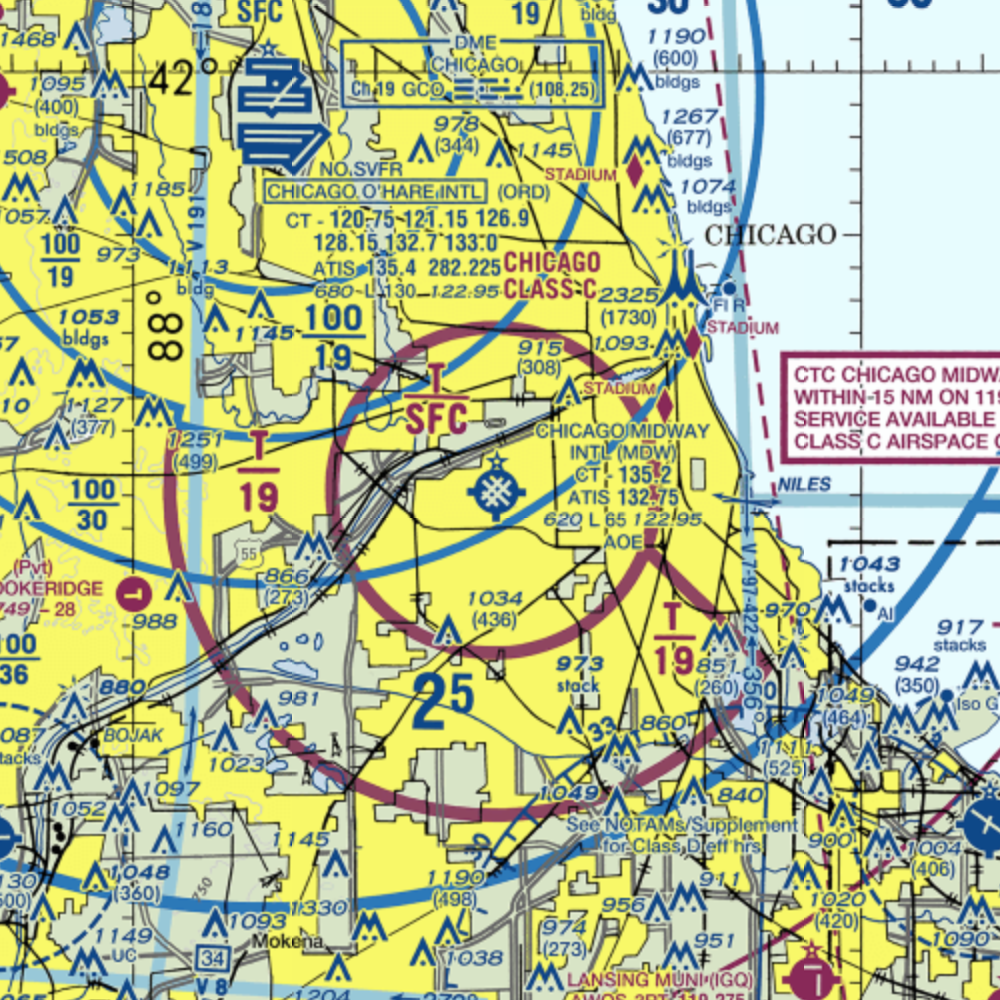 The modifications aim to enhance separation between incoming traffic to Midway Runway 22L and general aviation aircraft flying along the Lake Michigan shoreline using Visual Flight Rules. To provide information about these changes, the FAA will conduct virtual meetings on June 6 and June 7, accessible through Zoom and their YouTube channel. The meetings will include presentations on the modifications, and attendees can ask questions either during the Zoom sessions or via the chat feature on FAA's social media channels.
Saturday, June 3, 2023
Saturday, June 3, 2023 @ 8:00 AM
UPDATE: On Saturday, June 3, 2023, the President signed into law H.R. 346, which requires the Administrator of the Federal Aviation Administration to establish a task force to provide recommendations for improvement of Notices to Air Missions (NOTAMs).
May 23, 2023 — H.R. 346, the NOTAM Improvement Act of 2023, is a legislation aimed at enhancing the Notice to Air Missions (NOTAM) system for pilots submitted in response to the January 12, 2023 system crash.
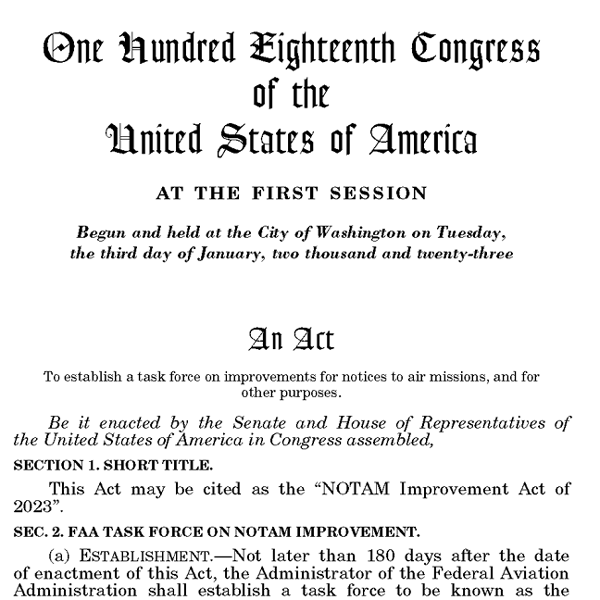 The bill, which received near-unanimous Congressional approval, recognizes the current shortcomings of the system, which often presents information in a complex and cumbersome manner, leading to difficulties in understanding and accessing critical flight information.
The act mandates the Federal Aviation Administration (FAA) to modernize the NOTAM system by streamlining and digitizing its content, making it more user-friendly and easily accessible to pilots. The FAA is required to adopt a standardized format, simplify language, and utilize technology to improve the dissemination and retrieval of NOTAMs for flight planning resources such as iFlightPlanner and the Regulatory Compliant Weather Briefs it provides.
The objective is to enhance aviation safety by ensuring pilots have timely and comprehensible information to make informed decisions during flight operations.
» H.R.346 - NOTAM Improvement Act of 2023
Thursday, June 1, 2023
Thursday, June 1, 2023 @ 8:00 AM
 The FAA has proposed a rule to remove the expiration date on flight instructor certificates, aligning flight instructor certificates with other non-expiring pilot certificates.
A three-month grace period would be added allowing instructors to restore recent experience by completing a Flight Instructor Refresher Course (FIRC). The AOPA, who has been advocating for this change since 1999, believes these changes will benefit the public, encourage expired instructors to rejoin the CFI community, and reduce administrative processing.
The proposed rule offers several options for maintaining currency, including passing a practical test, endorsing students with a high pass rate, serving in specific roles, completing an approved FIRC, or participating in the FAA's WINGS Pilot Proficiency Program.
Comments on the proposed rule can be submitted HERE until June 22, 2023.
Monday, May 22, 2023
Monday, May 22, 2023 @ 7:58 PM
In anticipation of the large number of aircraft operating to and from areas hosting major sporting and entertainment events, the FAA has published updated procedures in its Domestic Notices valid from May 18, 2023 to enhance safety and minimize air traffic delays.
THESE PROCEDURES MAY BE REVISED OR UNAVAILABLE AT THE TIME OF THE EVENT. PILOTS SHOULD CHECK NOTICES AND TRAFFIC ADVISORIES PRIOR TO DEPARTURE TO ENSURE THE MOST CURRENT INFORMATION. THESE NOTICES DO NOT SUPERCEDE RESTRICTIONS PERTAINING TO THE USE OF AIRSPACE CONTAINED IN FDC NOTICES.
Thursday, May 18, 2023
Thursday, May 18, 2023 @ 8:00 AM
Official airport, navigation and chart data for the FAA's 28-day AIRAC cycle beginning 5/18/23 became current today as of 09:01Z. This includes updated georeferenced data for airport diagrams and instrument approach procedures available in iFlightPlanner for iPad and iFlightPlanner for iPhone.
Anytime you access iFlightPlanner or iFlightPlanner for AOPA from your desktop, laptop, or smartphone browser you can be confident you're seeing the most current and accurate data available.
To ensure iFlightPlanner is current on your iPhone or iPad, simply tap "Check for Updates" in the upper-left corner of the Downloads tab. Each app will quickly tell you which packages need to be updated!
The iFlightPlanner Crew
PLAN. FLY. LOG.
Monday, May 15, 2023
Monday, May 15, 2023 @ 8:00 AM
iFlightPlanner for iPad and iFlightPlanner for iPhone users may now download airport and navigation data as well as aeronautical charts, georeferenced airport diagrams and terminal procedures for the FAA Data Cycle that goes into effect on May 18, 2023. Simply tap the button in the upper-left corner of the Downloads tab to "Check For Updates."
Pilots using iFlightPlanner for AOPA or iFlightPlanner on their desktop, laptop, or smartphone will see the iFlightPlanner Cloud automatically make the transition to the new data at 9:01Z on May 18.
Thursday, May 11, 2023
Thursday, May 11, 2023 @ 8:00 AM
 The FAA has released the EAA AirVenture Oshkosh 2023 Notice (formerly called the NOTAM) featuring arrival and departure procedures for for EAA's annual fly-in convention to be held July 24-30 at Wittman Regional Airport (KOSH) in Oshkosh, WI.
The Notice, which is in effect from Noon CDT on July 20 to noon CDT on July 31, 2023, outlines procedures for the many types of aircraft that fly to Oshkosh for the event, as well as aircraft that land at nearby airports. The Notice was designed by FAA to assist pilots in their EAA AirVenture flight planning.
While the overall procedure is similar to past years, there are some changes compared to the 2022 version. Some of those changes include:
- A change in the pattern for ultralights at Wittman Regional Airport
- Guidance regarding Oshkosh aircraft parking areas, including North 40/South 40 designation
- Elimination of the Fond du Lac diversion procedure
- The start times of the daily air shows have been changed from 2:30 to 2:15pm CDT
Pilots can acquire a digital version of the Notice HERE or by downloading it through the EAA AirVenture website. For a free printed copy, pilots can order online or call EAA Membership Services at (800) 564-6322.
Please know this Notice does not supersede restrictions contained in other FDC NOTAMs, however it is required reading and should be part of every pilot's preflight preparation.
Remember to print your arrival and departure signs before your trip and fly safe!
Monday, April 24, 2023
Monday, April 24, 2023 @ 8:00 AM
In anticipation of the large number of aircraft operating to and from areas hosting major sporting and entertainment events, the FAA has published updated procedures in its Domestic Notices valid from April 20, 2023 to enhance safety and minimize air traffic delays.
THESE PROCEDURES MAY BE REVISED OR UNAVAILABLE AT THE TIME OF THE EVENT. PILOTS SHOULD CHECK NOTICES AND TRAFFIC ADVISORIES PRIOR TO DEPARTURE TO ENSURE THE MOST CURRENT INFORMATION. THESE NOTICES DO NOT SUPERCEDE RESTRICTIONS PERTAINING TO THE USE OF AIRSPACE CONTAINED IN FDC NOTICES.
Thursday, April 20, 2023
Thursday, April 20, 2023 @ 8:00 AM
Official airport, navigation and chart data for the FAA's 56-day AIRAC cycle beginning 4/20/23 became current today as of 09:01Z. This includes updated georeferenced data for airport diagrams and instrument approach procedures available in iFlightPlanner for iPad and iFlightPlanner for iPhone.
Anytime you access iFlightPlanner or iFlightPlanner for AOPA from your desktop, laptop, or smartphone browser you can be confident you're seeing the most current and accurate data available.
To ensure iFlightPlanner is current on your iPhone or iPad, simply tap "Check for Updates" in the upper-left corner of the Downloads tab. Each app will quickly tell you which packages need to be updated!
The iFlightPlanner Crew
PLAN. FLY. LOG.
Monday, April 17, 2023
Monday, April 17, 2023 @ 8:00 AM
iFlightPlanner for iPad and iFlightPlanner for iPhone users may now download airport and navigation data as well as aeronautical charts, georeferenced airport diagrams and terminal procedures for the FAA Data Cycle that goes into effect on April 20, 2023. Simply tap the button in the upper-left corner of the Downloads tab to "Check For Updates."
Pilots using iFlightPlanner for AOPA or iFlightPlanner on their desktop, laptop, or smartphone will see the iFlightPlanner Cloud automatically make the transition to the new data at 9:01Z on April 20.
Monday, March 27, 2023
Monday, March 27, 2023 @ 8:00 AM
In anticipation of the large number of aircraft operating to and from areas hosting major sporting and entertainment events, the FAA has published updated procedures in its Domestic Notices valid from March 23, 2023 to enhance safety and minimize air traffic delays.
THESE PROCEDURES MAY BE REVISED OR UNAVAILABLE AT THE TIME OF THE EVENT. PILOTS SHOULD CHECK NOTICES AND TRAFFIC ADVISORIES PRIOR TO DEPARTURE TO ENSURE THE MOST CURRENT INFORMATION. THESE NOTICES DO NOT SUPERCEDE RESTRICTIONS PERTAINING TO THE USE OF AIRSPACE CONTAINED IN FDC NOTICES.
Thursday, March 23, 2023
Thursday, March 23, 2023 @ 8:00 AM
Official airport, navigation and chart data for the FAA's 28-day AIRAC cycle beginning 3/23/23 became current today as of 09:01Z. This includes updated georeferenced data for airport diagrams and instrument approach procedures available in iFlightPlanner for iPad and iFlightPlanner for iPhone.
Anytime you access iFlightPlanner or iFlightPlanner for AOPA from your desktop, laptop, or smartphone browser you can be confident you're seeing the most current and accurate data available.
To ensure iFlightPlanner is current on your iPhone or iPad, simply tap "Check for Updates" in the upper-left corner of the Downloads tab. Each app will quickly tell you which packages need to be updated!
The iFlightPlanner Crew
PLAN. FLY. LOG.
Monday, March 20, 2023
Monday, March 20, 2023 @ 8:00 AM
iFlightPlanner for iPad and iFlightPlanner for iPhone users may now download airport and navigation data as well as aeronautical charts, georeferenced airport diagrams and terminal procedures for the FAA Data Cycle that goes into effect on March 23, 2023. Simply tap the button in the upper-left corner of the Downloads tab to "Check For Updates."
Pilots using iFlightPlanner for AOPA or iFlightPlanner on their desktop, laptop, or smartphone will see the iFlightPlanner Cloud automatically make the transition to the new data at 9:01Z on March 23.
Monday, February 27, 2023
Monday, February 27, 2023 @ 8:00 AM
In anticipation of the large number of aircraft operating to and from areas hosting major sporting and entertainment events, the FAA has published updated procedures in its Domestic Notices valid from February 23, 2023 to enhance safety and minimize air traffic delays.
THESE PROCEDURES MAY BE REVISED OR UNAVAILABLE AT THE TIME OF THE EVENT. PILOTS SHOULD CHECK NOTICES AND TRAFFIC ADVISORIES PRIOR TO DEPARTURE TO ENSURE THE MOST CURRENT INFORMATION. THESE NOTICES DO NOT SUPERCEDE RESTRICTIONS PERTAINING TO THE USE OF AIRSPACE CONTAINED IN FDC NOTICES.