The Altitude & Terrain Profile View in iFlightPlanner and iFlightPlanner for AOPA provides pilots with a detailed, visual cross-section of their route, helping identify terrain and wind conditions along the way. This powerful planning tool makes it easy to visualize how altitude, terrain, and winds aloft interact throughout each leg of flight, offering a quick reference for maintaining safe terrain clearance and optimizing performance.
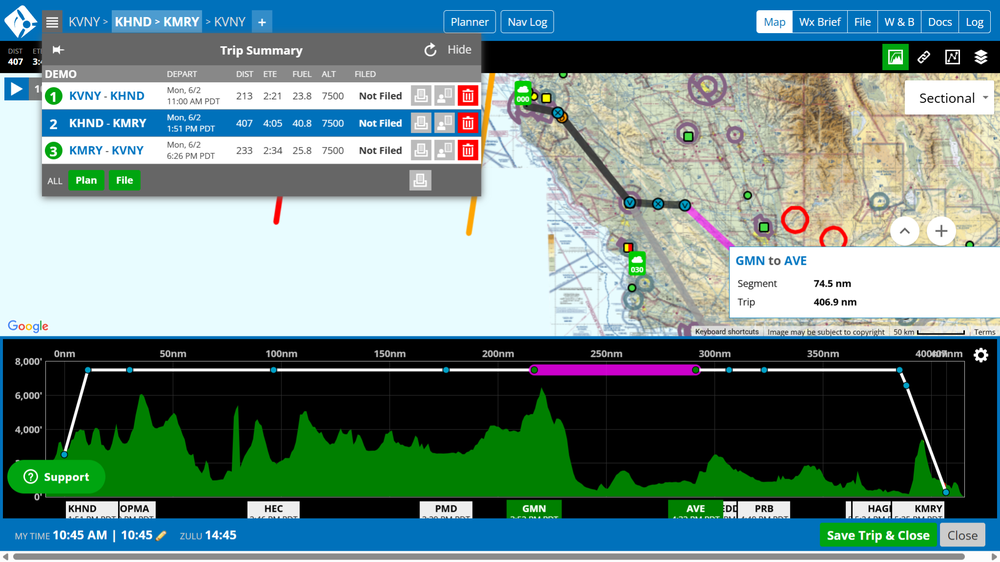
Activated by clicking the “Toggle Altitude & Terrain Profile View” button in the Map Toolbar, the feature appears below the map in the Trip Planning interface. Terrain along the route is color-coded—green indicates terrain 2,000 feet or more below the flight path, yellow within 2,000 feet, and red within 1,000 feet. Pilots can also enable wind data, adjust the corridor width from ½ to 20 nautical miles, and customize settings to display wind direction, magnitude, and relative favorability.

To set whether the Terrain Profile View is visible by default, simply toggle it off using the Map Toolbar button, open the Map Layers menu, and click “Save Defaults.” Pilots may also manage visibility in My Account > My Settings > Flight Planning Options. The view’s gear icon opens Profile View Settings, where users can enable “Always Show Settings” for permanent visibility and easily compare terrain clearance and winds aloft for safer, more informed flight planning. Whether planning a short VFR hop or a cross-country IFR route, the Terrain Profile View adds an extra layer of insight to your preflight decision-making.
iFlightPlanner Comment:
The Terrain Profile View is one of several enhancements designed to make trip planning more intuitive, visual, and data-rich in iFlightPlanner. Try it on your next flight and see how altitude, terrain, and winds interact along your route to help you plan smarter and fly safer.
The iFlightPlanner Crew
PLAN. FLY. LOG.